
Skip to content
Pune · WordPress & CMS Development

WordPress websites for Pune teams.

Softglimmer builds and improves WordPress websites for Pune businesses whose teams need to publish and update content regularly. We scope content models, responsive templates, editing controls and approved integrations around the visitors and editors using them. Working remotely from Ranchi, we review the existing site before a rebuild or migration, and agree launch checks, handover and ongoing maintenance responsibilities.

Explore Pune
A website your visitors can use and your editors can maintain.
  1. 01

    Plan the content

    Give recurring services, projects and articles a useful structure.

  2. 02

    Build and edit

    Connect responsive templates with practical editor controls.

  3. 03

    Launch and maintain

    Agree preservation, quality checks and recovery responsibilities.

An example journey, shaped around your requirements.

A new WordPress site, or a better way to run the one you have.

We can scope a new business website, improvements to an existing WordPress site or a reviewed migration from another platform. The starting point is the content and functionality the business needs to keep, not a theme installation presented as a complete solution.

The work can include recurring content types and fields, responsive themes/templates, media and section controls, editor roles and approved form or service connections. We review what should be shared, what each page owns and how editors will preview and publish changes. A configured theme and a custom implementation have different design, dependency and maintenance implications.

The contact-update example below demonstrates one publishing requirement. It does not limit the service to a single field change: the wider site and editor experience can be included in the agreed scope.
Match the CMS scope to the site and publishing team.

Keep useful content and working functionality visible while comparing the options.

01

Build a structured new site

Plan the required page and content types, reusable templates and visitor journeys together with the team’s editing responsibilities.

Discuss before build: Agree the initial content and launch requirements.

02

Improve an existing WordPress site

Inspect its current theme, plugins, content and integrations before deciding what to retain or change. A focused correction may be more useful than a complete rebuild.

Discuss before build: Identify the publishing or visitor problem first.

03

Migrate with a preservation plan

Review content, media, URLs and connected services before selecting data mapping and the route plan. A new layout does not by itself define a safe switch.

Discuss before build: Name the records and journeys that must survive.

Define the website and editor outputs together.

The brief selects the content, template and integration work that is needed. Technical maintenance remains an explicit responsibility alongside day-to-day publishing.

01

Content and editor model

Map recurring content, shared data, editor roles and publication needs before creating the fields and templates.

A structure the publishing team can review.
02

Responsive theme and templates

Build or adapt the agreed branded layouts for service, project, article or other pages included in the site.

Reusable templates and reviewed responsive behaviour.
03

Useful editing controls

Provide the selected content fields, media choices and section controls, with clear decisions about what editors may change.

An editor experience suited to the team.
04

Approved integrations

Review forms and supported services, account ownership and dependency requirements before implementing the connections in scope.

Documented functionality and delivery checks.
05

Site and publishing checks

Review important visitor journeys, search foundations and the content-editing/publishing tasks before launch.

Acceptance checks for visitors and editors.
06

Maintenance and recovery handover

Document who handles updates, backups, recovery and later changes, including the site’s dependency and hosting responsibilities.

A practical operating plan.

Preserve the right things and demonstrate the new workflow.

For an estimate, share the existing site, recurring content types, editor responsibilities, approved integrations and content or URL preservation needs. Explain whether the problem is a new site, a difficult publishing task or a migration. Our Ranchi studio reviews remotely with the nominated editors and technical owner; agreed decisions and a demonstrated publishing walkthrough support the handover.

  1. 01

    Inspect and scope

    Review the content, theme, plugins and working functionality. Compare WordPress with another CMS where the publishing requirements suggest it.

    A site brief and written estimate.
  2. 02

    Design and implement

    Review templates and editor controls, then implement the chosen content model and integrations against those decisions.

    A site and editing experience to assess.
  3. 03

    Check and launch

    Test the agreed visitor and editor tasks, and reconcile any migration or URL-preservation work before the switch.

    An acceptance and launch checklist.
  4. 04

    Run and improve

    Hand over the agreed publishing controls and operating notes. Assign technical updates, backups and monitoring rather than leaving them to the content editor by default.

    Explicit support and recovery responsibility.

Commission a manageable WordPress publishing change.

We can scope the content structure, WordPress implementation, editor preview and handover for this shared-contact task. The existing theme, plugins and stored fields need inspection before choosing how the approved contact is reused. A focused update and a wider CMS rebuild require different access, migration and recovery work. The proposal should identify that boundary clearly.

Share the affected pages and a sanitised example of the new contact through the project enquiry. We review the current setup before proposing delivery stages and a written estimate. A commissioned change includes the agreed consumer-page checks and editor recovery demonstration. Hosting access, a suitable backup and the information owner’s approval are prerequisites for implementation and release.

A hypothetical working example

One service contact changes, but several public pages still refer to it.

Consider a hypothetical Pune consultancy with a general enquiry route and a separate contact for one service. The service contact changes, and an editor updates the main service page. The previous details also appear in a campaign page and a downloadable introduction. The team needs to know which references should change and which belong to an older dated document. A useful first WordPress phase can establish an approved shared entry for current contact facts and a review list of its public uses, without assuming that every document should be silently replaced.

A contact entry needs a purpose

Describe what the destination is for: general enquiries, a service question or an existing-customer request. Keep the public label alongside the phone, email or link. Decide who owns its accuracy and when it was last checked. A shared value without a service purpose can spread the same mistake more efficiently across the website.

A reuse list makes the change reviewable

Identify the actual places where the current contact is used. Include visible page copy, buttons, footer entries and the scoped materials linked from the website. Distinguish a live current contact from historical attribution in a dated article or file. The editor should be able to explain which uses will change, rather than relying on a search-and-replace operation.

Publish one approved contact change and check every page that uses it.
  1. 01

    Approve the contact

    Record the responsible service, person and destination.

  2. 02

    Preview the uses

    Inspect the pages and materials that depend on it.

  3. 03

    Publish and verify

    Check the actual public journey after the update.

Illustrative project planning sequence.

Agree what is shared and what each editor can approve.

01

Model the approved current facts

Define the small group of values that belong together: contact label, purpose, destination and accountable owner. Decide whether the site has one general contact or several service routes. Inspect a real example with a longer label and a different destination type. Avoid treating unrelated contacts as one value merely because they currently happen to match.

02

Choose reuse to fit the editor task

Review how the existing WordPress site stores each contact reference before selecting an editing approach. The implementation may use the site’s existing structured fields or a scoped reusable presentation. The brief should explain which editor changes the approved entry and which page author can choose it. It should also identify places that require a separate update.

03

Use revision history within its scope

WordPress documentation describes revisions for post and page changes. That can support the editorial review of affected content, but it is not proof of a complete backup of site settings, media and external systems. Agree which changes use revision recovery and which require another recovery method, then demonstrate the relevant route with the intended editor.

04

Check labels and destinations together

W3C guidance recommends labels that describe their associated form controls. When a contact update accompanies an enquiry form, review the field labels and route context alongside the changed destination. Check phone, email and web links on the actual pages. A contact displayed correctly is still incomplete if its action points to the previous address.

A publishing task with a visible beginning and end.

01

Contact ownership and reuse map

Approved current entries, their purposes and the public pages that consume them. The map identifies dated references and separately maintained downloads. It names the owner who can confirm a destination and the reviewer who checks the meaning of a service-specific change.

02

Editor update and preview flow

An editing structure suited to the actual WordPress site, with representative changes demonstrated before handover. The preview shows every scoped consumer, including a smaller display. Notes explain which references update together and where the editor must make a separate reviewed change.

03

Release and recovery checklist

A bounded list of pages, link actions and supporting files to inspect after publication. It includes the agreed recovery methods and their limits, plus a deliberately mistaken update for the handover exercise. The checklist gives the owner a practical way to verify a future change.

Follow the changed destination through the visitor’s next step.

Bring the current public pages, the approved replacement destination and the person responsible for that service. Identify the linked files and campaign pages that use the contact. Explain whether older dated materials should remain available with context or receive an agreed replacement. The project team should not decide that business policy from the appearance of the page.

Ask the intended editor to prepare the change, then have another owner inspect the complete route. Read the service purpose, open the relevant link and confirm the displayed facts match the actual destination. Inspect the general contact as well as the changed service contact, because a shared structure must not erase a legitimate difference between them. Include an incorrect email value and demonstrate the agreed correction or recovery task.

Remote Pune sessions can focus on this complete publishing sequence with our Ranchi team. A successful handover should let the editor explain what changed, which pages were checked and what still needs a separate review. Wider CMS development, migration or integrations can be scoped after the current contact model and its maintenance responsibilities are understood.

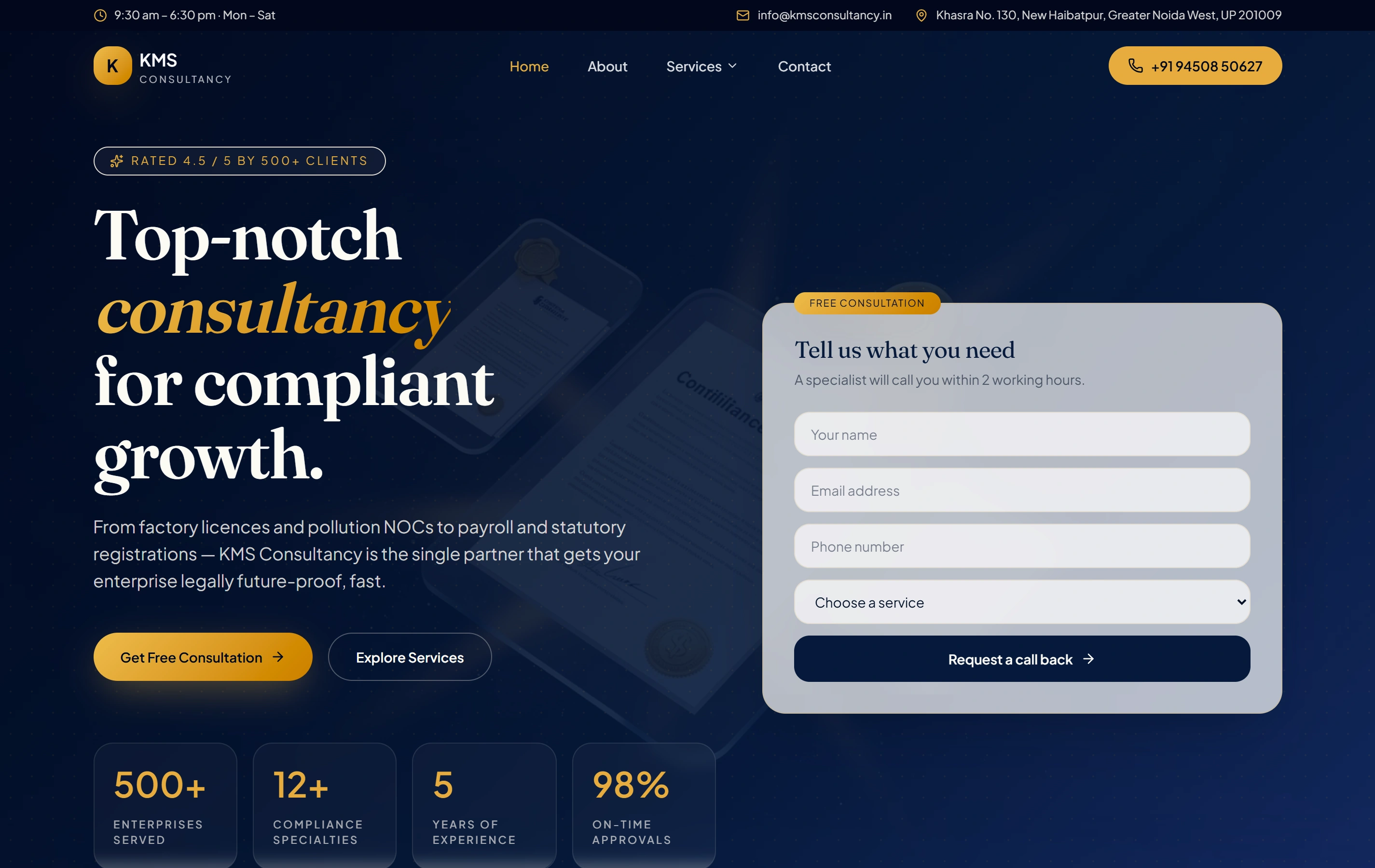
Organised service information in the KMS Consultancy website.

The KMS Consultancy website presents consultancy services and a clear enquiry route. It is genuine public website evidence of organising service information for visitors. This page does not claim that the site uses WordPress, shared contact fields or the publishing workflow described here; those are proposed decisions for your own CMS brief.

ContentCompliance
StructureService pages
ActionEnquire
KMS Consultancy websiteKMS Consultancy

Choosing the service and defining the project.

Can you improve our existing site without replacing everything?

Yes. We inspect its content, theme, plugins and functionality before proposing changes. The scope can preserve working parts and focus on the visitor or editor tasks that need improvement.

Can we update recurring content ourselves?

The agreed content types, fields and templates can support recurring information such as services, projects or articles. We review the controls with the people who will publish it and provide a handover suited to their responsibilities.

Can the work include a migration and existing URL preservation?

A migration is scoped after reviewing content, media, routes and integrations. Data mapping and a route plan come before the switch, with checks for the material and journeys that need to be retained.

Is WordPress suitable for every portal or business workflow?

No. A simple member area may fit, while complex access, transactions or operational rules can require a separate custom application. We compare the actual requirement, integration limits and maintenance effort before selecting the approach.

Can one edit update every contact reference on the site?

Only references connected to the agreed shared entry can behave that way. We first inspect the current storage and reuse. Linked documents, independent campaigns and external listings may need separate reviewed updates.

Will a WordPress revision restore every website setting?

Do not assume that. Revisions support specific post and page changes. We document the recovery method for the scoped contact storage, settings and supporting files separately, then demonstrate the relevant tasks.

Can separate services keep different contacts?

Yes, if that reflects the business process. The model should keep each approved service route distinct and make the editor’s choice understandable. Shared content should not force unrelated services to use the same destination.

How will our Pune editor work with you?

Our studio is in Ranchi. We can work remotely through an agreed example update, preview review and written handover, with your owner confirming the public facts and destinations. No Pune office or local client result is implied.