Help the right visitor explain the right requirement.
A business website should make the first enquiry easier to understand. If visitors cannot tell which service fits their location or what information your team needs, a larger contact form may only create more confusion. Softglimmer plans business websites for Indore around those decisions: useful service pages, a focused brief and a clear route to a reviewer. We deliver remotely from our Ranchi studio. Coverage, claims and response expectations are confirmed with your team before they become public content.
Service coverage, useful requirements and accountable business website enquiries.
01
Check the service
Explain the offering, its limits and relevant coverage.
02
Describe the requirement
Carry the chosen service into a concise quote brief.
03
Begin the review
Confirm receipt and direct the request to its owner.
An example journey, shaped around your requirements.
A hypothetical working example
A facilities enquiry needs context before anyone can quote.
Imagine a facilities-service business receiving requests for planned cleaning and occasional site work. A buyer has more than one premises and wants to understand which requirements can be reviewed together. This is a hypothetical website-planning scenario, not a completed facilities project or a claim about businesses in Indore. The website should help that visitor identify a suitable service and share the basic context without suggesting that a quotation has already been accepted.
Make coverage understandable before submission
A service page can explain the type of work considered, relevant location information and situations that need a conversation first. If your delivery boundary varies by offering, state that accurately instead of using one broad promise throughout the site. Agree how an uncertain location is handled: invite a review, give an appropriate contact route or explain the limit. The wording is a business decision before it is a form rule.
Keep the initial brief proportionate
For this example, the reviewer might need the selected service, general site location, preferred timing and a short description. A full site survey or sensitive building document may be unnecessary at first contact. Decide which inputs genuinely help the next step and which can wait. The visitor should understand why a required field matters and what the team will do with the request.
Service coverage, useful requirements and accountable business website enquiries.
01
Check the service
Explain the offering, its limits and relevant coverage.
02
Describe the requirement
Carry the chosen service into a concise quote brief.
03
Begin the review
Confirm receipt and direct the request to its owner.
Hypothetical planning example. Final requirements are agreed with your team.
Decisions before design
Define what a good enquiry contains.
These decisions make the service pages and form work as one journey.
01
Carry the service context without hiding it
An enquiry started from a service page can arrive with that service selected, while still allowing the visitor to correct it. Display the choice plainly. If several services can be requested together, agree how the reviewer will distinguish them; a comma-separated message with no context may be hard to route. Also test someone who opens the form from the main navigation and has made no selection.
02
Use labels that remain visible
W3C’s forms guidance calls for labels associated with controls. Give the location, contact and requirement fields clear names; a placeholder alone should not carry their meaning. Explain optional fields and show an error beside the relevant input when correction is needed. Review the form using a keyboard and on a narrow screen, including the state after an unsuccessful submission.
03
Decide whether attachments belong in phase one
If a reviewer really needs uploaded material, define acceptable files, size limits, access and retention. OWASP recommends layered upload checks and cautions against trusting the submitted content type. An upload feature is separate work, with storage and security decisions of its own. For an initial quotation enquiry, a short description followed by a controlled document request may be sufficient.
An agreed delivery scope
A website whose information and enquiry can be reviewed together.
The delivery scope records the public pages, working form and operational handover.
01
Service pages built from approved facts
The content map identifies each offering, coverage wording, supporting images and the next action. It includes important exclusions in ordinary language and assigns an editor to details that change. Mobile layouts let visitors compare the relevant information before opening the brief. We use supplied or approved assets, with image descriptions based on what they actually show.
02
A focused enquiry with an honest receipt state
The agreed form collects the selected service and necessary context, validates the submission and sends it to the specified destination. Its confirmation describes receipt and the next review; it does not claim a booking or quote has been approved. Acceptance checks include missing required information, correction, failed delivery and a successful request, without sending test messages to real customers.
03
Editing access and an enquiry handover
Your nominated editor receives the agreed content controls and guidance for keeping coverage current. The recipient knows which fields arrive, where a response is recorded and who covers an absence. Hosting, backups, maintenance and any CRM connection are written into the agreed responsibilities rather than assumed to be part of a contact button.
Prepare the project
Use one suitable request and one unsuitable request as acceptance examples.
Prepare the brief with the colleague who would actually review these enquiries.
Describe the normal route to a response
Bring a redacted requirement and explain why it is suitable. Identify the first reply your team would make and the information needed before a quotation can be prepared. Walk through the visitor’s starting page, service selection and confirmation. If two colleagues must review the request, document their handover instead of leaving it implied by a shared inbox.
Write the uncertain case
Choose an example with a location or requirement outside the usual scope. Decide whether the website should explain a limit or invite a manual review. Neither the form nor its receipt message should imply that every request can be delivered. Check the same case on mobile so a long service label or error does not conceal the decision.
List what must survive a replacement website
Record useful existing URLs, approved content, image permissions and working enquiry destinations. Separate an outdated service description from information that still helps visitors. If this is a redesign, agree URL handling and a recovery point before launch. We can then review the website against the actual scope, including the parts that should be retained.
Documented website work
A documented B2B website with a procurement enquiry route.
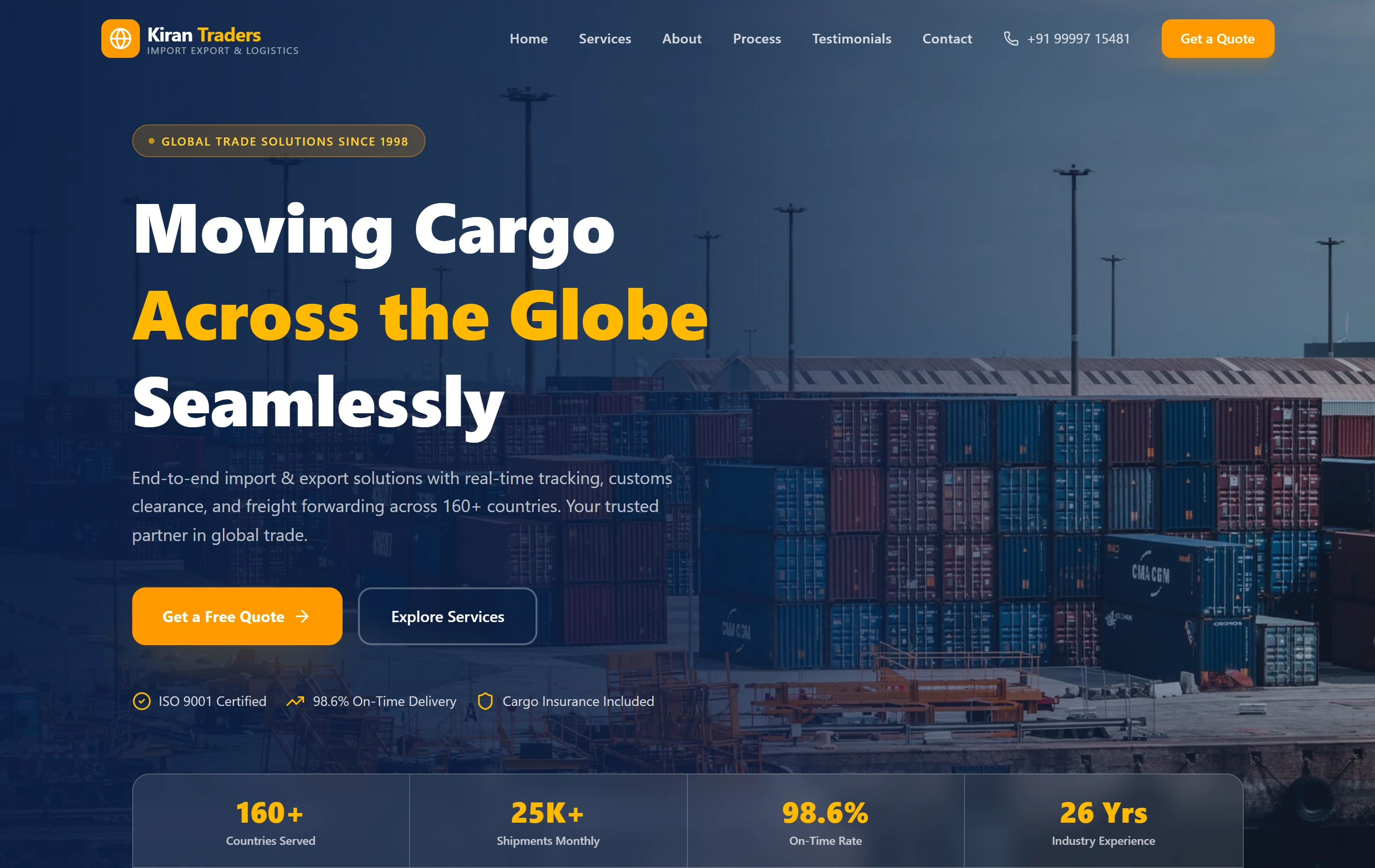
Kiran Traders is shown in our portfolio as an import-export website organising service information and directing procurement enquiries to the team. Its real screenshot is the featured reference here. It does not demonstrate a facilities workflow, an Indore client or a particular enquiry result. Your service coverage and quotation requirements would be designed from your own approved information.
Does this include a local Indore office or on-site visit?
Delivery is remote from Ranchi. This page offers business website planning for Indore; it makes no local-office claim. Any travel or on-site requirement would need a separate agreement. We can review content and layouts remotely with your designated business approver.
Can a request automatically receive a final quotation?
Only if the pricing and eligibility rules are sufficiently defined and that feature is included in scope. A basic enquiry should acknowledge receipt and support a human review. We would first examine exceptions and the effect of missing information rather than treat every submitted form as an accepted quotation.
Can we keep our current contact details and useful pages?
Yes, preservation can be part of the brief. Provide the current routes, enquiry destinations and materials that remain accurate. We agree replacements and migration checks before launch, including any URL changes. Existing functionality still needs verification in the new environment.
How will we know the form is ready?
Use the agreed acceptance cases to check its fields, mobile behaviour, validation and destination. Confirm both receipt and the recipient’s ability to use the submitted context. Test under a controlled procedure; a visible success message alone does not prove that the review team received an enquiry.
Continue planning
Continue the website brief.
Use these guides to settle related decisions before implementation.