Skip to content
Retail Ecommerce Websites for Kochi Product Enquiries

Explain the product difference before the customer makes a selection.

A retail customer may recognise a product family while needing help to choose the relevant version or accessory. The catalogue should make approved distinctions understandable before the customer commits to an order or sends a question. Softglimmer plans retail ecommerce websites for Kochi businesses around product information, selection and the actual selling process. Our office is in Ranchi and the project is delivered remotely through agreed reviews. We inspect the existing catalogue and store arrangements first, preserve supplied product facts and define the scope around the information the business can maintain. Platform and checkout decisions follow that discovery.

Explore Kochi
Product-version and compatibility information that helps a retail visitor choose the relevant item before ordering or enquiring.
  1. 01

    Find the product family

    Use categories the retail team can maintain.

  2. 02

    Understand the difference

    Show the approved version and compatibility context.

  3. 03

    Choose the next action

    Offer the appropriate order or enquiry route.

An example journey, shaped around your requirements.

A hypothetical working example

Two similar accessories refer to different product versions.

Imagine a hypothetical Kochi retailer listing accessories that look similar but are intended for different versions of a product. The photographs and names do not make the distinction clear, so a customer cannot confidently choose. This is a working example, not a delivered store claim. The website needs approved version and compatibility information, a consistent presentation and a route for an unresolved product question before the customer treats visual similarity as evidence that the item is suitable.

Show the business-approved distinction

Use the supplier or retailer’s approved specification rather than inferring compatibility from an image. Identify which product version the item describes and where a buyer should seek clarification. The catalogue can make that information easier to read without inventing a universal fit claim or a technical assurance the business has not substantiated.

Offer a useful unresolved route

A visitor may know the product family but not its version. Decide whether the first step should be an enquiry or a retail order and explain the difference. If the question needs staff review, the acknowledgement should describe the received request. It should not imply that stock, compatibility or a final order has been confirmed.

Product distinction and selection
  1. 01

    Find the product family

    Use categories the retail team can maintain.

  2. 02

    Understand the difference

    Show the approved version and compatibility context.

  3. 03

    Choose the next action

    Offer the appropriate order or enquiry route.

Hypothetical planning sequence.

Give catalogue details a maintained source.

01

Inventory product families and versions

Review the actual catalogue, product identifiers and the approved relationship between versions. Decide which details are shared and which need item-specific wording. A reusable page pattern should not erase the distinction that matters to the customer. Assign an owner for corrections when a supplier changes a specification or an older version remains in the catalogue.

02

Choose the product option model

Shopify’s documentation describes variants as combinations of product option values. That provides one possible catalogue structure when Shopify fits the project. The business still needs to decide whether a difference belongs as an option, a separate product or explanatory information; the platform feature does not automatically establish the correct relationship for the supplied catalogue.

03

Connect information to the selling process

Determine which items can be ordered through the store and which need a conversation first. Review the source of availability and any fulfilment connection rather than treating a displayed product as proof it is ready to ship. The first release can retain the existing operating system where it remains useful, with any checkout or integration change separately scoped.

04

Keep product images and text aligned

Preserve approved images and describe the information they convey. A representative photo should not silently become proof of the exact version selected. Review labels, supporting detail and the mobile product journey together. The retailer supplies compatibility facts and permissions for the imagery; the website project makes those approved inputs coherent.

A catalogue that supports a considered selection.

01

Product relationship brief

A reviewed map of families, versions, identifiers and the approved compatibility or suitability information the public page may show.

02

Retail browsing design

Responsive categories and product pages that help the visitor recognise meaningful differences while preserving supplied facts and images.

03

Order and enquiry boundaries

A documented next step for ready-to-order items and unresolved questions, including the source of availability and acknowledgement wording.

04

Catalogue publishing handover

Instructions for adding a version, correcting a specification and checking the related product journey after an approved update.

Bring the products that are easiest to confuse.

Prepare a small set of catalogue examples, including similar items with different versions and a product question staff need to clarify. Gather their approved specifications, identifiers and images together. If source material disagrees, the retailer resolves the factual distinction before it becomes public. The website team should not fill a missing compatibility field with a plausible assumption.

Identify the current store or ordering arrangement and the system responsible for availability. The website scope may improve catalogue clarity without replacing checkout or fulfilment. If Shopify is proposed, review the actual product structure and operational requirements before choosing a theme or connection. A product option feature does not prove the business’s records are ready to use it consistently.

During remote review, the Kochi catalogue owner validates product relationships while our Ranchi team presents the browsing and next-action journey. Follow an unfamiliar item on a phone-sized layout and inspect what happens when the customer cannot determine the version. The handover should make future corrections practical, including which related pages or images need another check when a product detail changes.

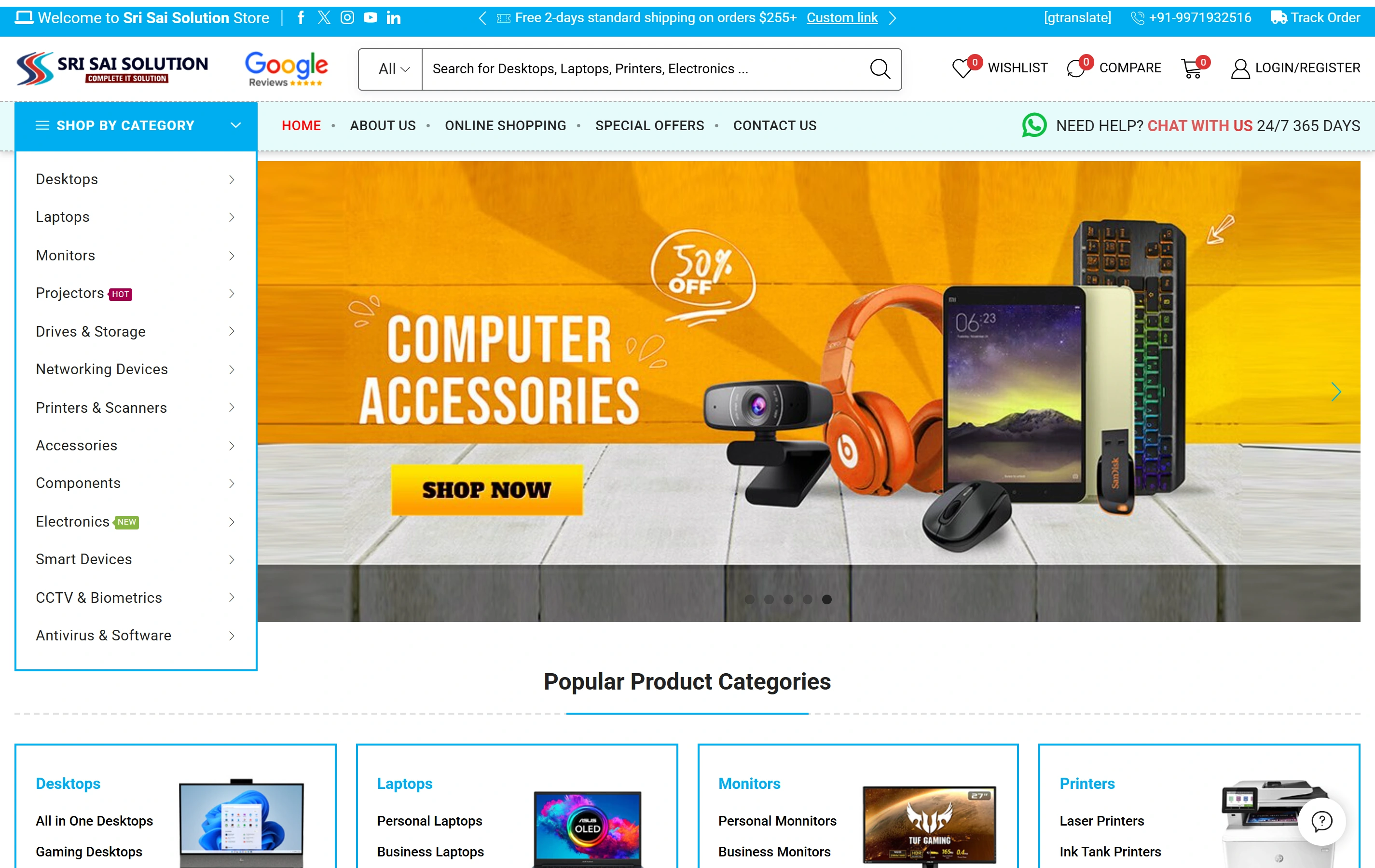
A genuine electronics ecommerce website.

Sri Sai Solution is a documented Softglimmer website with product categories, catalogue search and online shopping for computers and electronics. It provides real catalogue presentation evidence. The portfolio does not establish Shopify technology, compatibility validation, live inventory connections or results for the hypothetical Kochi retailer.

Electronics catalogueA focused retail offering
Product discoveryDifferent ways to find a product
Shopping experienceStorefront presentation
Sri Sai Solution websiteSri Sai Solution

Project questions.

Must every version be a separate product?

That depends on the supplied catalogue and selling process. We review identifiers, options and the distinction the customer needs to understand. A variant may fit one relationship while a separate product fits another. The business approves that model and the factual information attached to it.

Can a product photograph establish compatibility?

The website should use the retailer’s approved specification and wording. A photograph may help recognition without proving a particular fit. Where the buyer cannot identify the relevant version, a clear enquiry route can support the next conversation instead of encouraging an unsupported assumption before ordering.

What does the Kochi retailer review remotely?

The catalogue owner confirms product facts, image permissions and the order-versus-enquiry boundary. Our Ranchi team prepares the structure and implementation for review. Availability, checkout and fulfilment dependencies are inspected as their own scope, with evidence kept separate from the public catalogue design.