Brand & Digital Launch Planning for Kochi Businesses
Give the team one approved starting point.
A launch can involve a logo, website, proposal and several people preparing everyday material. The useful question is whether everyone knows which version to use and what may change. For a Kochi business, Softglimmer helps connect identity decisions to practical launch materials. We work remotely from our Ranchi studio, with an agreed approver and review stages. This guide focuses on ownership and handover before a growing folder of drafts becomes the team’s unofficial brand system.
Approved identity assets and consistent launch materials with clear ownership.
01
Choose the approved direction
Confirm the message and the identity assets that represent it.
02
Prepare real uses
Review the website, proposal and everyday material you need.
03
Hand over ownership
Give editors the correct files, permissions and instructions.
An example journey, shaped around your requirements.
A hypothetical working example
A founder’s launch folder reaches three different editors.
Imagine a new business preparing a website, a proposal and a social announcement. Each editor receives a different logo draft and makes their own choice of type and colour. This is a hypothetical founder-to-team handover, not an identified Kochi client or a claim about local business trends. The first improvement is to distinguish approved assets from exploration and decide who can approve a change.
Treat approval as a usable decision
An editor needs to know which files are current, which layout can be adapted and where to request something new. A presentation of attractive mockups may not answer those questions. Identify the actual launch formats and review a finished example in each so the handover can be evaluated as working material.
Approved identity assets and consistent launch materials with clear ownership.
01
Choose the approved direction
Confirm the message and the identity assets that represent it.
02
Prepare real uses
Review the website, proposal and everyday material you need.
03
Hand over ownership
Give editors the correct files, permissions and instructions.
Hypothetical planning example. Final requirements are agreed with your team.
Decisions before design
Separate identity work from the tools that use it.
A connected brief can still have clear deliverable boundaries.
01
What must the identity communicate?
Describe your actual offering, audience and the tone you want to use. Bring language and visual references that help explain those choices, with any existing assets you are authorised to use. A direction should be reviewed against your business information, without invented milestones or claims.
02
Which materials are needed at launch?
Choose the formats that your team will actually prepare: perhaps a proposal, website assets and one social template. List the people editing them and the software they can use. A large collection of exports is less useful if no one can adapt the required document.
03
Who controls the next version?
Name a single approval route for new artwork and amendments. Keep rejected concepts separate from the launch kit. Website coding, content publishing and ongoing campaign creation can be separate work even when they use the same identity; include only agreed items in the first phase.
An agreed delivery scope
A launch brief that reaches beyond a logo preview.
Agree the working materials and their owners before production.
01
An approved identity direction
A reviewed direction connects the business message, visual choices and intended uses. Your approver can compare it against a few actual materials rather than a mood board alone. Any required name, logo or asset permissions are recorded as inputs to confirm, not presumed from an image search.
02
A focused material inventory
The inventory lists what should be supplied for the agreed proposal, website and communication uses. It distinguishes editable templates from final exports and identifies material the team must still provide. File access, image permissions and responsibility for final copy remain visible.
03
A team handover to test
A nominated editor uses the approved kit to prepare one ordinary piece of material. That review reveals missing files, unclear formatting and changes that need approval. The handover records where the kit lives and who can update it after launch.
Prepare the project
Prepare the launch around actual documents.
Bring materials that reveal how your team works today.
Choose one proposal and one public touchpoint
A redacted proposal shows the information an editor needs to present. A current webpage or announcement shows how a customer encounters the business. Mark what is accurate, what is only a draft and what is waiting for an owner’s decision.
List the people who will reuse the assets
Record whether an editor uses a browser tool, presentation software or a design application. Note printing or supplier requirements that affect the handover. Avoid agreeing a file format simply because it looks professional if the responsible person cannot use it.
Set a review and replacement route
For remote work between Kochi and Ranchi, agree the approver, review window and how feedback is consolidated. Decide how a correction reaches every editor after approval. A short release note can explain which asset changed and whether existing material must be replaced.
Documented website work
A documented corporate website presentation.
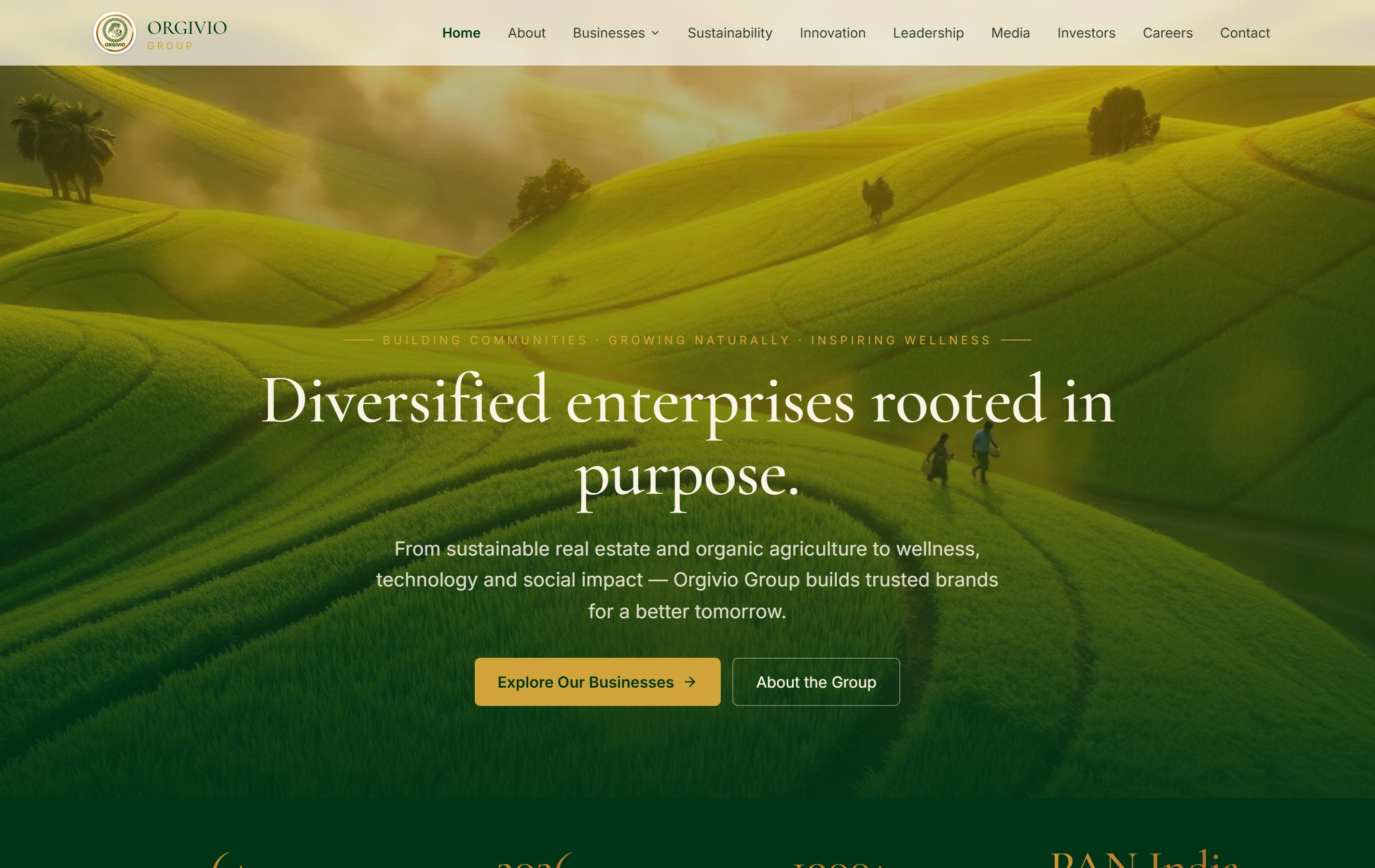
Orgivio Group is presented in our portfolio as a corporate website covering its businesses, sustainability, leadership and stakeholder information. This is the real website screenshot. It provides a reference for organising a business presentation online; it is not proof that Softglimmer created its identity, a Kochi client relationship or a complete brand launch kit.
Group presentationOne recognisable company story
Business divisionsSpecific routes from the overview
Our studio is in Ranchi and we can deliver remotely for a Kochi business. Reviews and approvals are agreed with your team. This guide describes a service area; it does not imply a local office or that the hypothetical launch example is a previous client.
Can we use an existing logo?
Yes, if you have the necessary rights and usable files. We can review how it should appear in the agreed materials and identify gaps in the handover. A new logo is a separate decision; it should not be assumed merely because the website or proposal needs updating.
Does brand work include the website?
Only when website design and development are expressly included. An identity kit can supply approved assets for a website while coding, CMS controls and launch checks remain separate scope. We connect the decisions so each deliverable has a clear reviewer and completion boundary.
Can you guarantee trademark availability or sales?
No. Identity design does not establish legal availability or predict commercial results. Any name or trademark review belongs with a qualified adviser. The design scope can still be judged on approved assets, usable templates and a handover your team can follow.
Continue planning
Choose the material you need next.
These pages help connect identity decisions to implementation.