Skip to content
Shopify Development for Leeds Product Variant Journeys

Show the selected option clearly when the shopper returns to the product.

A shopper may choose a product option, share the page with another person and return later to compare it with an alternative. The store needs to make that selected version understandable throughout the journey. Softglimmer plans Shopify storefront work for Leeds teams around product option information, catalogue ownership and the actual customer task. Our office is in Ranchi and the work is delivered remotely through agreed reviews. Discovery inspects the current store and product data before proposing a theme change or custom interaction. The scope should preserve useful existing functionality while explaining what a shared link or unavailable option will show.

Explore Leeds
Product option selection that stays understandable when a shopper returns through a shared product link.
  1. 01

    Choose the option

    Show the relevant version and its approved details.

  2. 02

    Return to the page

    Retain or explain the intended selection.

  3. 03

    Resolve an unavailable choice

    Give the shopper a useful next action.

An example journey, shaped around your requirements.

A hypothetical working example

A shared product page opens without the option the shopper meant.

Imagine a hypothetical Leeds retailer selling a product with several finishes and sizes. A shopper chooses one combination and shares the page, but the person opening it cannot tell which option was intended. This is a working example, not a delivered storefront claim. The first scope should define the shared-link and selection behaviour, including what happens if the chosen option changes or becomes unavailable before someone returns.

Make the current selection readable

The product name, option controls and supporting detail should describe the same choice. A visual highlight can support that information but should not be its only expression. Review the image and availability wording for the selected option, so a returning shopper does not mistake a general product description for the particular version they meant to assess.

Explain a missing or unavailable selection

The store owner decides what alternatives are useful when the intended option cannot be selected. The interface should explain the observed state without silently substituting another version and presenting it as the original choice. The customer may compare an alternative or ask a question, with that next action kept distinct from a completed order.

The returning product shopper
  1. 01

    Choose the option

    Show the relevant version and its approved details.

  2. 02

    Return to the page

    Retain or explain the intended selection.

  3. 03

    Resolve an unavailable choice

    Give the shopper a useful next action.

Hypothetical planning sequence.

Agree the option and link behaviour with the catalogue owner.

01

Review the product option model

Shopify documents variants as combinations of product option values and supports managing their inventory. The catalogue owner still needs to approve the model and maintained data for the store. Review which distinctions belong to the selected version and which describe the wider product family before changing how the storefront presents them.

02

Define the shared-link contract

Inspect the current store and any theme or app behaviour involved in returning to a product. Agree whether the intended option can be represented in the link and what the interface does if it is missing or no longer valid. The project should validate the chosen implementation rather than assume every theme handles this journey in the same way.

03

Keep the selected details consistent

Review the relationship between the option controls, images, availability information and order action. The shopper needs a coherent version of the product, even after changing a choice several times. Supplied product facts remain authoritative inputs; the website team should not infer an option’s material, dimensions or suitability from a photograph.

04

Preserve the existing store boundary

Inventory the apps, checkout arrangement and product links already in use. A focused selection change should not expand into replacing unrelated integrations without a reason and a separate scope. Record which operating system owns stock and order information, and keep a successful interface selection distinct from confirmation that an order has been accepted.

A storefront scope for the returning shopper.

01

Option and data brief

An approved description of product families, variant distinctions and the details that must match the selected version.

02

Shared-link journey design

A considered return path covering a valid selection, a missing choice and an option the current store can no longer offer.

03

Responsive selection implementation

The agreed storefront behaviour and relevant checks, preserving supplied product information and working store connections.

04

Catalogue and theme handover

Instructions for checking the journey after product changes or a theme update, with the catalogue and technical owners identified.

Choose the option journeys worth testing.

Bring representative products and the links shoppers currently share. Include a simple product, one with meaningful option differences and a choice that is no longer available. The catalogue owner should explain which details change with the selected version. That information is more useful than treating every option control as an identical visual widget.

Identify the current theme, apps and checkout arrangements as dependencies to inspect. The first scope can focus on selection and the returning visitor while retaining the working store. Any broader platform or fulfilment change needs separate discovery. A portfolio website with product browsing does not prove that the same variant model or theme behaviour will suit this store.

During remote review, the Leeds owner approves option meanings and unavailable-choice treatment while our Ranchi team presents the actual journey. Check a shared page on a phone-sized layout and compare what the returning shopper sees with the intended choice. The handover should repeat that task after a catalogue or theme change, so future updates preserve the agreement instead of quietly changing how existing product links behave.

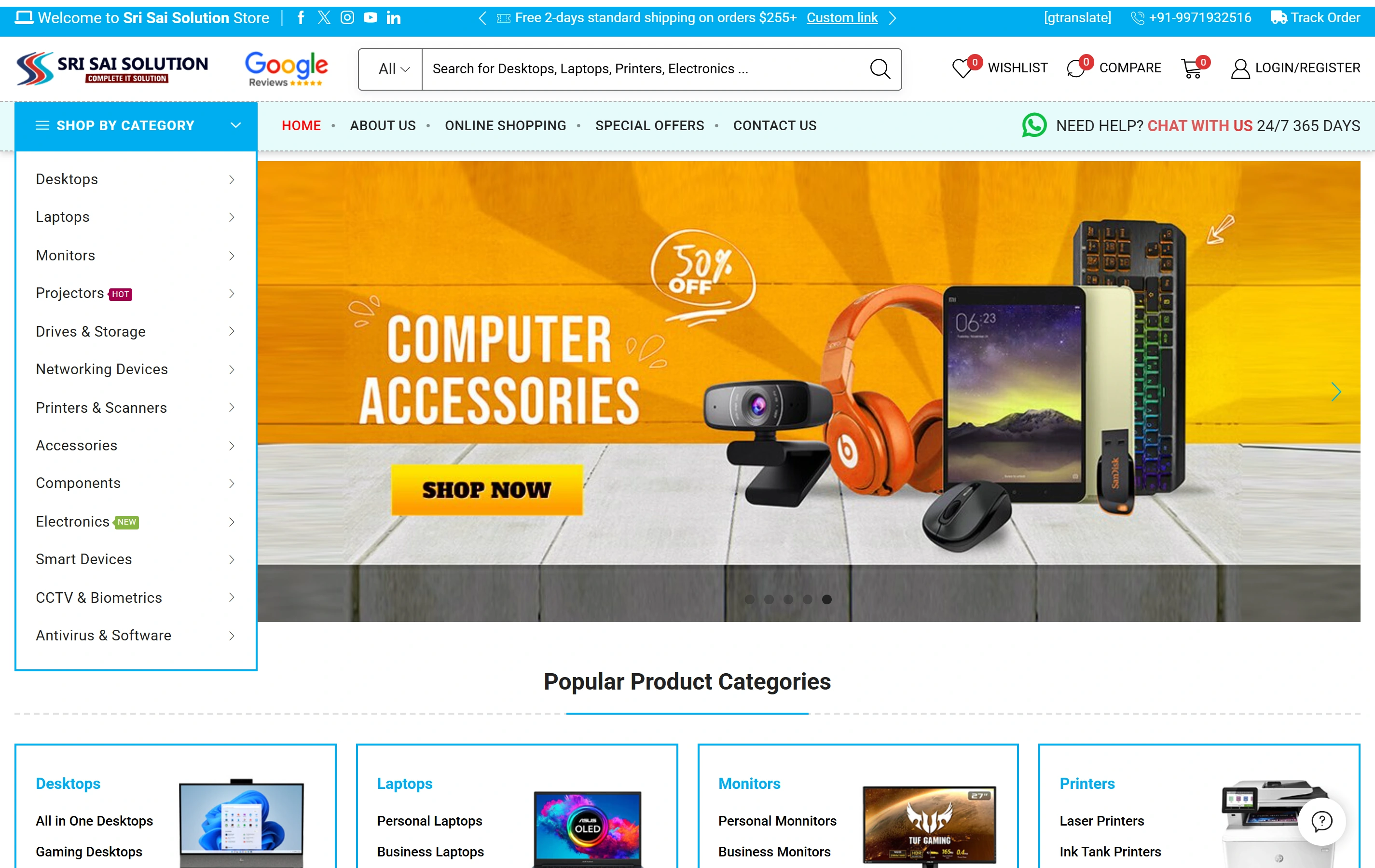
Real product browsing from the website portfolio.

Softglimmer’s Sri Sai Solution portfolio documents an electronics ecommerce website featuring product categories, catalogue search and online shopping. It illustrates genuine product browsing. The portfolio does not identify Shopify technology or prove the shared-link, variant selection or availability behaviour proposed for the hypothetical Leeds store.

Electronics catalogueA focused retail offering
Product discoveryDifferent ways to find a product
Shopping experienceStorefront presentation
Sri Sai Solution websiteSri Sai Solution

Project questions.

Will every Shopify theme preserve a selected option in the same way?

We inspect and validate the actual theme and app arrangement before defining that behaviour. The scope records what a shared link represents and how the interface responds to an invalid selection. A platform feature alone does not establish that the existing storefront implements the intended return journey.

Can the project retain current checkout and fulfilment tools?

That is an important option to assess first. A focused variant journey can preserve useful existing integrations when they fit the scope. Any replacement or additional connection should have a clear reason, ownership and acceptance boundary rather than being assumed from a request for Shopify development.

Who approves the Leeds product journey remotely?

The catalogue owner confirms option meanings and the treatment of unavailable choices. Our Ranchi team prepares the design and implementation for review. A coordinating technical contact identifies theme and app dependencies, helping the team distinguish a product-data correction from a storefront behaviour change.