Skip to content
School Website Development for Lucknow Admissions Teams

Make the school year visible in every admissions journey.

A family comparing schools needs more than a welcoming photograph. They need to know which programme the information describes, which academic session it applies to and how to ask the next admissions question. Softglimmer plans school websites for Lucknow teams around that practical journey. The work connects programme pages, campus information and approved notices so parents can recognise the current information without reconstructing it from scattered attachments. Our Ranchi office delivers the project remotely through agreed content and design reviews. We start by inspecting the school’s existing pages and publishing process before proposing a new structure.

Explore Lucknow
Current admissions information, session-aware resources and accountable updates for school families.
  1. 01

    Choose a programme

    Show the stage and session the page describes.

  2. 02

    Find current information

    Give notices a clear status and content owner.

  3. 03

    Ask admissions

    Explain the next conversation and receiving team.

An example journey, shaped around your requirements.

A hypothetical working example

An old notice still looks like this year’s admissions instructions.

Imagine a hypothetical Lucknow school with a programme page, a downloadable admissions notice and an enquiry form created in different years. A parent sees the notice through a saved link and cannot tell whether it still applies. This is an illustrative working case, not a claim about a school we serve. The website needs a deliberate way to connect the programme, the relevant session and the school’s current instructions while making useful older material distinguishable.

Give a notice its context

Show the approved title, applicable session and publication status alongside the document link. The school decides whether an older notice should remain available, be replaced or direct families to the current information. A filename alone is a poor place to communicate that decision, particularly when someone arrives without visiting the homepage first.

Connect the question to admissions

A parent may know the intended class but need to clarify eligibility, documents or the next visit. The public form should ask for the context admissions has agreed to receive and explain what follows. An acknowledgement means the enquiry was received; it does not establish an admission offer, assessment outcome or reserved place.

  1. 01

    Choose a programme

    Show the stage and session the page describes.

  2. 02

    Find current information

    Give notices a clear status and content owner.

  3. 03

    Ask admissions

    Explain the next conversation and receiving team.

Hypothetical planning sequence.

Build around the school’s publishing responsibilities.

01

Define the session structure

Agree how academic sessions, programmes and notices relate. Some programme information may remain useful across years, while dates and application instructions change. Record which parts are shared and which need a session label. This prevents a new notice from quietly changing the meaning of an older page that families may still visit.

02

Name the content approver

Identify who can approve admissions instructions, campus information and public announcements. A website editor should know which changes are routine and which need review. Include a correction process for an outdated attachment or mistyped date. Publishing permissions and school policy are project inputs, rather than assumptions inferred from staff job titles.

03

Organise readable page sections

Separate programme overview, practical requirements and the enquiry step with descriptive headings. W3C explains that headings communicate page organisation and support navigation. The implementation review checks the resulting structure with the actual content, so a long notice is not reduced to a single visual heading followed by an undifferentiated text block.

04

Protect useful existing routes

Inventory programme pages, public documents and links used in announcements before replacing the site. Decide where each retained or replaced resource belongs. The migration plan records address changes and checks the resulting journeys, including someone opening an older shared link directly rather than beginning from the new navigation.

A maintainable information journey for families.

01

Programme and session map

A page plan showing the programmes, applicable sessions and supporting resources, with an agreed approach to older notices and replacement information.

02

Admissions enquiry journey

Form wording, receiving responsibility and acknowledgement copy that explain the first contact without implying a place or decision has been confirmed.

03

Notice publishing pattern

A reusable presentation for approved announcements and attachments, including titles and contextual information that editors can update consistently.

04

School editorial guide

A handover showing common updates, review responsibilities and the tested procedure for correcting a published page or replacing a document.

Collect the information a parent actually needs.

Ask admissions staff to gather the current prospectus or approved programme information, active notices and the questions they commonly clarify in a first conversation. Mark which material applies to a specific session. Bring the existing URLs as well as the documents themselves: a resource may be useful because families already have its address, even when the navigation no longer points to it.

Choose a small set of review journeys. One family might start with a programme page; another may open a document received from the school; a third may be looking for campus contact information on a phone. Follow each route through to the current enquiry instructions. If the school uses a separate admissions platform, record its ownership and public destination before discussing any connection or replacement.

Photographs, student information and public achievements should come with the school’s approval for the proposed use. The website brief should preserve supplied facts and explain who authorises future changes. A calendar or notice feed also needs a practical publishing owner after handover. Review the new structure with that editor using a realistic correction, such as changing a session label and replacing an attachment, before considering the website ready for release.

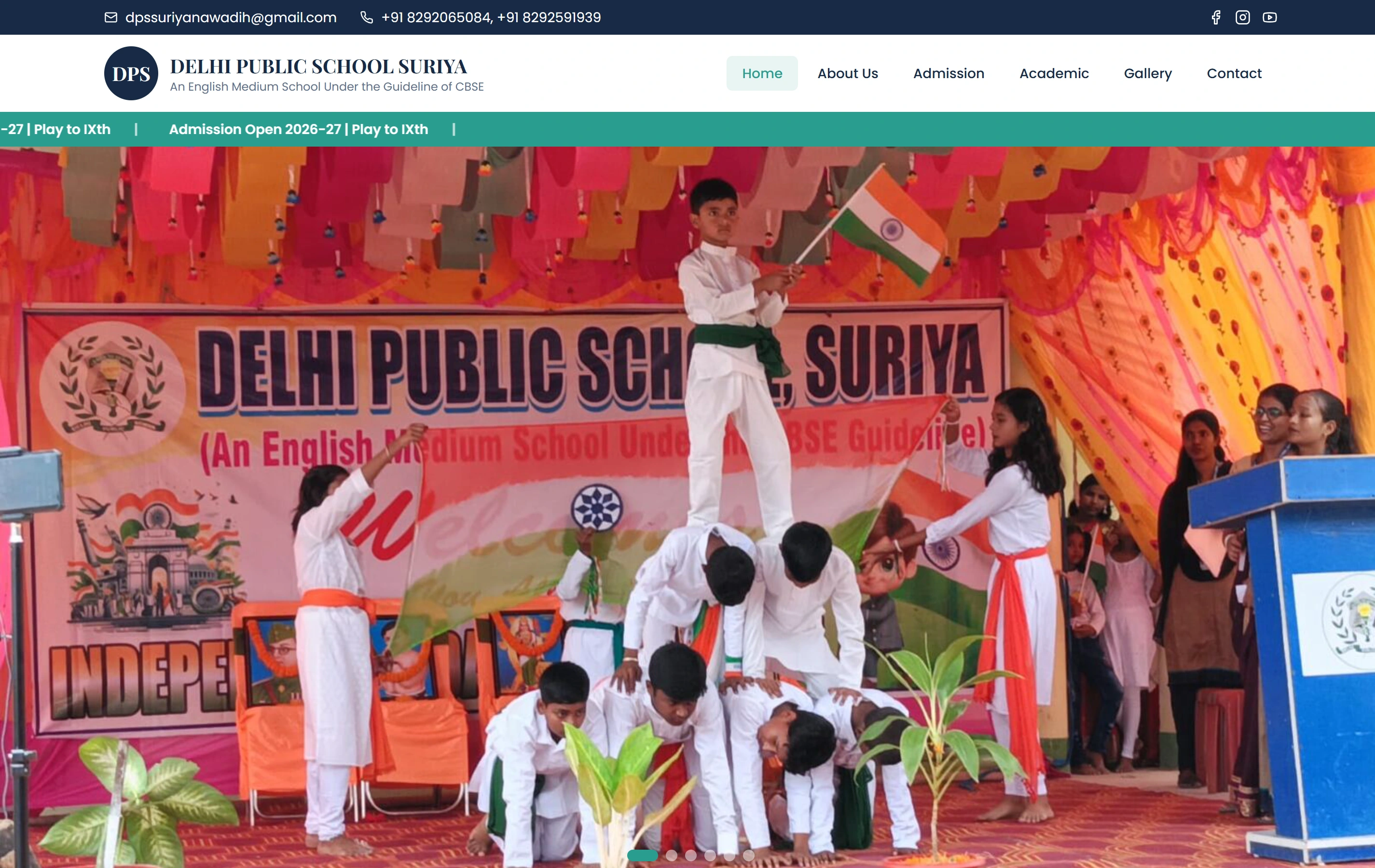
Review a genuine school website example.

DPS Suriya is a documented Softglimmer school website presenting programmes, campus information and an admissions journey. That visible information structure is relevant to this brief. The portfolio does not establish admissions results or prove the session-aware publishing rules proposed here. Those rules belong in the commissioned website scope and acceptance review.

AudienceParents
ContentProgrammes
ActionAdmissions
Delhi Public School, Suriya websiteDelhi Public School, Suriya

Questions before commissioning the work.

Does every new session need a separate programme page?

Not necessarily. The useful decision is which content remains shared and which information changes with the session. We review the school’s actual material before choosing the structure. The result should make the current instructions clear while retaining older resources only where the school has decided they remain useful.

Can staff publish notices without technical help?

The agreed CMS scope can give editors a consistent way to update approved notices and resource links. The handover uses the school’s real publishing tasks. It also explains changes that require another reviewer or technical support, rather than treating every attachment, layout and address change as the same kind of edit.

What must the Lucknow school provide for remote review?

A content owner, current approved information and access to inspect the existing public journeys are the starting points. Our Ranchi team prepares the structure and implementation for review. Admissions staff validate instructions and enquiry wording, while the nominated school reviewer approves the material that will become public.