A digital learning project can involve public information, signed-in content and a mobile experience. These are different responsibilities, even when one team owns them. For a Lucknow organisation preparing a website, portal or app, Softglimmer begins with the learner’s task and the people who maintain it. Our studio is in Ranchi and delivery is remote. This guide helps you define a manageable first release without assuming that every learning resource needs an app.
Published learning content, account context and understandable progress handovers.
01
Define the audience
Distinguish a visitor exploring a course from a signed-in learner.
02
Release the content
Name who approves a module and publishes its current version.
03
Support the journey
Decide how learners report an issue and recover their place.
An example journey, shaped around your requirements.
A hypothetical working example
An adult learner cannot tell which resource is current.
Imagine a training organisation sharing a course outline, a revised module and a support email across different channels. A learner opens an earlier file and asks whether it still applies. This is a hypothetical example for scope planning, not a Lucknow client, a completed learning platform or a statement about local training businesses. The first task is to identify which information is public, which belongs to an account and who approves a replacement.
Separate discovery from participation
Prospective learners may need clear programme information and an enquiry route. Enrolled users may need current resources and a record of their activity. Write each journey independently before deciding whether one website, a portal or a mobile app should deliver it. A single audience label can otherwise conceal very different access and support needs.
Published learning content, account context and understandable progress handovers.
01
Define the audience
Distinguish a visitor exploring a course from a signed-in learner.
02
Release the content
Name who approves a module and publishes its current version.
03
Support the journey
Decide how learners report an issue and recover their place.
Hypothetical planning example. Final requirements are agreed with your team.
Decisions before design
Choose a product boundary that your team can maintain.
Use the intended learner task to compare approaches.
01
Start with the content owner
Name the person who prepares, reviews and releases material. Record how a correction reaches users who have already opened it. If these decisions are unresolved, a publishing dashboard will not settle them. The scope should show the approval responsibility alongside the learner-facing screen.
02
Identify why an account is needed
An account can connect a person to authorised resources and saved activity, but it also creates recovery and support work. Explain which task needs identity. Public programme information should not require registration merely because another part of the product uses a sign-in screen.
03
Compare access in real conditions
Ask whether learners need an installed experience or can complete the task through a browser. Consider interruptions, available devices and how content is updated. An app may be appropriate, but installation and store release add responsibilities that should be included in the decision.
An agreed delivery scope
A first-release brief with visible ownership.
Agree the responsibilities as well as the intended screens.
01
An audience and content map
A reviewed map separates public programme details, signed-in resources and support information. It identifies the approved source of each module and the person who can replace it. Missing content or permissions remain listed as decisions to resolve before launch.
02
One journey to evaluate
A draft journey follows one adult learner from finding the right resource to completing the chosen task and requesting help. It includes an interruption, not only an ideal session. Your reviewers can use it to judge whether the proposed website, portal or app is suitable.
03
A release and support outline
The brief records access ownership, content approval, support contact and the person who decides whether the first release is ready. Additional course formats, payments and assessments can remain outside that phase. Each later addition should have its own acceptance examples.
Prepare the project
Bring one resource and the questions surrounding it.
Ordinary examples make the responsibilities easier to review.
Trace how material reaches a learner
Provide an approved, redacted sample and explain how it is distributed now. Note where users find its title, release date and replacement notice. Identify whether staff can tell which version a learner has seen without collecting unnecessary personal information.
Describe a support interruption
Choose a common issue such as an interrupted session or a resource that does not open. Describe what the learner currently reports and what a support colleague needs to help. Keep this example separate from an assessment or certificate rule unless those are actually in scope.
Arrange a consolidated review
Nominate content and technical contacts before remote sessions between Lucknow and Ranchi. Agree who resolves conflicting feedback and how approvals are recorded. A clear decision log helps keep the first release focused when the people preparing material and the people supporting users have different priorities.
Documented website work
A real school website with an information and admissions journey.
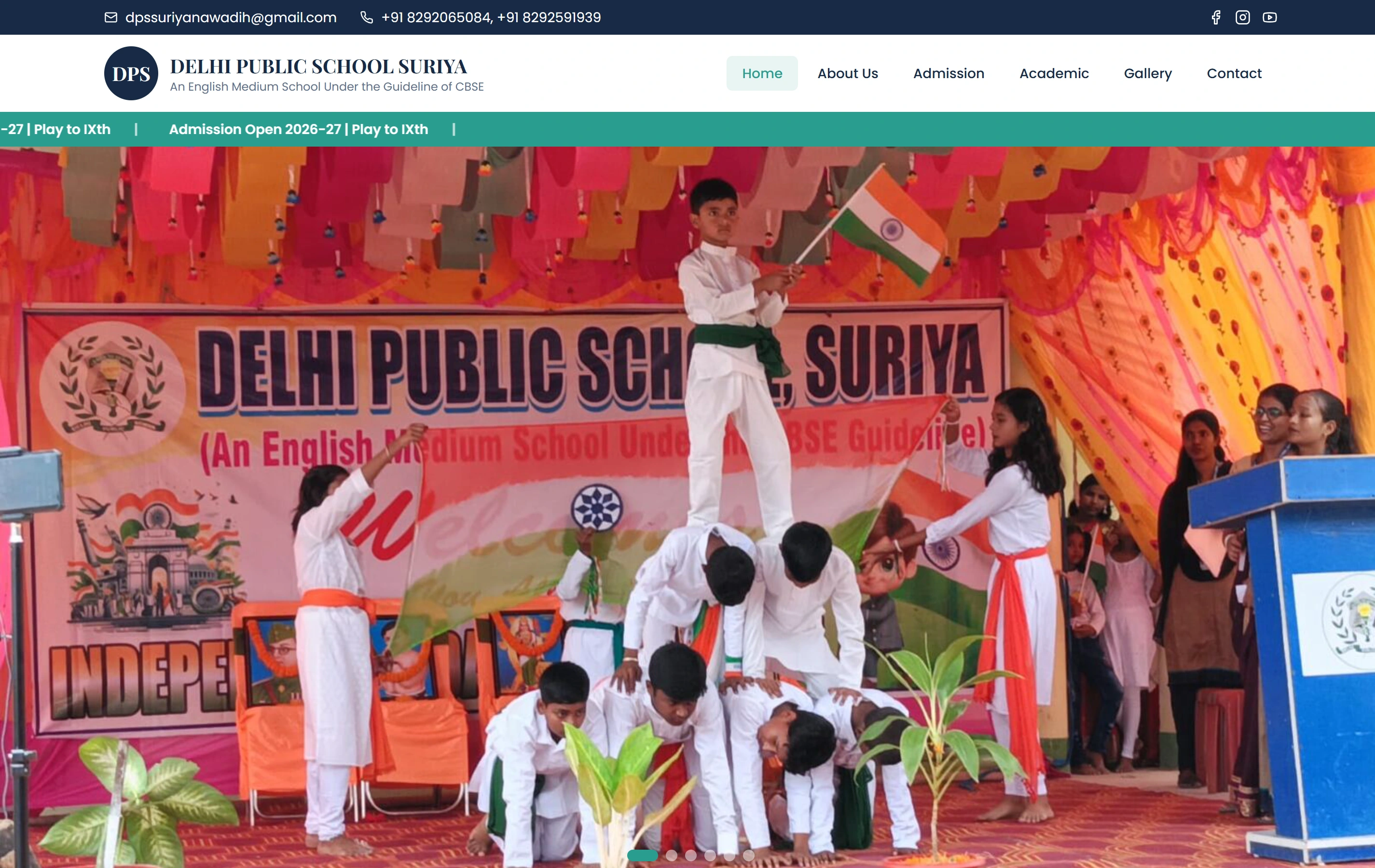
Delhi Public School, Suriya is documented as a mobile-friendly website presenting programmes, campus information and an admissions route for parents. The featured screenshot is that website. It illustrates public information presentation; it does not prove a learning app, saved learner progress or work for a Lucknow organisation.
Questions at the beginning of a learning-product project.
Are you based in Lucknow?
Softglimmer’s studio is in Ranchi. We can work with a Lucknow team remotely through agreed reviews and written approvals. This is a service-area guide, with hypothetical examples; it does not imply a local office or a completed local learning platform.
Do we need to build an app first?
Only if the learner task benefits from the proposed mobile capabilities and you can support them. Clear public content or a browser portal may solve the initial need. We can compare those approaches before committing to installation, account recovery and store-release work.
Can we publish resources before adding progress tracking?
That can be a sensible boundary when resource access is the first priority. State what users receive and what is not yet tracked. Adding progress later requires decisions about accounts, module versions and what counts as completion; it should not be implied by a download button.
What should our first brief include?
Bring one approved learning resource, its audience, current delivery method and a concrete support issue. Name the content approver and the person responsible for user access. We can then review a first journey and its operating responsibilities before choosing a technology.
Continue planning
Explore a suitable next step.
Continue with the scope that answers your immediate question.